MyPortfolio
 |
 |
|
 |
 |
 |
 |
 |
 |
MyPortfolio: منصة شخصية احترافية لعرض المهارات والمشاريع والخبرات مع تصميم عصري وتجربة مستخدم متقدمة. 💼
[Live Portfolio](https://omarsakr.vercel.app) • [Documentation](https://github.com/OmarrSakr/MyPortfolio/wiki) • [Report Issues](https://github.com/OmarrSakr/MyPortfolio/issues)
**`MyPortfolio`** is a modern, responsive personal portfolio website built with **`Next.js 14`**, **`TypeScript`**, and **`Tailwind CSS`**. It showcases professional experience, technical skills, and projects with smooth animations, interactive components, and a clean, intuitive design. The portfolio features dark/light theme support, contact form integration, and optimized performance.
## 📊 Project Stats
- 🎯 **Sections**: 8 main sections (Header, About, Experience, Expertise, Qualification, Portfolio, Tools, Contact)
- 📁 **Projects**: 10 completed projects with detailed documentation
- 🛠️ **Technologies**: 26+ tools and frameworks showcased
- ⭐ **Performance**: 85-95+ Google Lighthouse scores across projects
- 🌐 **Visitors**:





|
 |
 |
 |
 |
 |
 |
📑 Table of Contents
- 🌐 Live Demo
- 🚀 Features
- 🧑💻 Technologies Used
- 📂 Project Structure
- 🔧 Installation
- ⚙️ Usage
- 🛠️ Challenges & Solutions
- 📌 Future Improvements
- 📢 Known Issues
- 🤝 Contributing
- 📪 Feedback
- 📜 License
🌐 Live Demo
Check out the live portfolio at 👉 MyPortfolio Live
🚀 Features
- 🎨 Modern Design: Clean, professional interface with smooth animations and transitions
- 📱 Fully Responsive: Optimized for all devices (desktop, tablet, mobile)
- 🌙 Dark/Light Theme: System preference detection with manual toggle, persisted in localStorage
- ⚡ Performance Optimized: Next.js 14 with App Router, code splitting, and image optimization
- 🎭 Smooth Animations: Framer Motion for engaging scroll-triggered animations and micro-interactions
- 📧 Contact Form: EmailJS integration with form validation and success/error feedback
- 🔒 Form Security: Google reCAPTCHA integration for spam protection
- 🎯 SEO Optimized: Meta tags, structured data, and sitemap for better search visibility
- 📊 Interactive Components: Modal dialogs for project details and certifications
- 🎨 Custom UI: Built with Shadcn/UI and Radix UI for accessible, modern components
🧑💻 Technologies Used
Core Framework & Language
- Next.js 14: React framework with App Router and server-side rendering
- TypeScript: Type-safe development with enhanced IDE support
- React 18: Modern React with hooks and concurrent features
Styling & UI
- Tailwind CSS: Utility-first CSS framework for responsive design
- Shadcn/UI: Modern component library built on Radix UI primitives
- Radix UI: Accessible, unstyled component primitives
- CSS Variables: Dynamic theming support
Animation & Interaction
- Framer Motion: Advanced animations and page transitions
- React Simple Typewriter: Dynamic typing effects for hero section
- Custom Hooks: Smooth scrolling and intersection observers
Forms & Communication
- EmailJS: Client-side email sending without backend
- React Hook Form: Performant forms with easy validation
- Zod: TypeScript-first schema validation
State Management & Utils
- Zustand: Lightweight state management for modals and UI state
- React Context: Theme management and global state
- Custom Hooks: Reusable logic for scroll position, modals, etc.
Development Tools
- ESLint: Code linting and formatting
- PostCSS: CSS processing and optimization
- Sharp: Image optimization and processing
📦 Dependencies
{
  "@emailjs/browser": "^4.4.1",
  "@hookform/resolvers": "^3.3.4",
  "@radix-ui/react-*": "Latest versions",
  "framer-motion": "^11.18.2",
  "lucide-react": "^0.378.0",
  "next": "^15.5.3",
  "next-themes": "^0.3.0",
  "react": "^18.3.1",
  "tailwind-merge": "^2.3.0",
  "zod": "^3.23.6",
  "zustand": "^4.5.2"
}
📂 Project Structure
MyPortfolio/
├── app/                    # Next.js App Router (pages and layouts)
│   ├── (main)/            # Main route group
│   ├── download-cv/       # CV download page
│   ├── globals.css        # Global styles
│   ├── layout.tsx         # Root layout
│   ├── page.tsx          # Homepage
│   └── metadata.ts       # SEO metadata
├── components/            # Reusable UI components
│   ├── landing/          # Landing page sections
│   │   ├── about.tsx     # About section
│   │   ├── contact.tsx   # Contact form
│   │   ├── header.tsx    # Hero section
│   │   ├── experience.tsx # Skills & experience
│   │   ├── portfolio.tsx # Projects showcase
│   │   └── qualification.tsx # Education & certifications
│   ├── modals/           # Modal components
│   ├── ui/              # Shadcn/UI components
│   └── layout.client.tsx # Client-side layout wrapper
├── providers/            # Context providers
│   ├── theme-provider.tsx # Dark/light theme management
│   ├── toast-provider.tsx # Toast notifications
│   └── modal-provider.tsx # Modal state management
├── hooks/               # Custom React hooks
│   ├── use-scroll-position.tsx # Scroll tracking
│   ├── use-anchor.tsx   # Smooth scrolling
│   └── use-qualification-modal.tsx # Modal control
├── lib/                # Utility functions
│   ├── utils.ts        # Common utilities
│   ├── motion.ts       # Animation variants
│   └── menu-list.ts    # Navigation items
├── data/               # Static content
│   ├── information.ts  # Portfolio data
│   └── image-blur.ts   # Image placeholders
├── schemas/            # Data validation
│   └── index.ts       # Zod schemas
├── public/            # Static assets
│   ├── *.png         # Images and screenshots
│   ├── *.jpg         # Certificates and photos
│   └── favicon.ico   # Site favicon
├── .env.local         # Environment variables
├── next.config.mjs    # Next.js configuration
├── tailwind.config.ts # Tailwind configuration
├── tsconfig.json     # TypeScript config
├── package.json      # Dependencies
└── README.md         # Documentation
🔧 Installation
Prerequisites
- Node.js 18.17 or later
- npm, yarn, or pnpm package manager
Setup Instructions
- Clone the repository
git clone https://github.com/OmarrSakr/MyPortfolio.git cd MyPortfolio - Install dependencies
npm install # or yarn install # or pnpm install - Environment Setup
cp .env.example .env.local
Configure environment variables:
# EmailJS Configuration (Required for contact form)
NEXT_PUBLIC_EMAILJS_SERVICE_ID=your_service_id
NEXT_PUBLIC_EMAILJS_TEMPLATE_ID=your_template_id
NEXT_PUBLIC_EMAILJS_PUBLIC_KEY=your_public_key

# Google reCAPTCHA (Optional but recommended)
NEXT_PUBLIC_RECAPTCHA_SITE_KEY=your_recaptcha_site_key
NEXT_PUBLIC_RECAPTCHA_SECRET_KEY=your_recaptcha_secret_key

# Site Configuration
NEXT_PUBLIC_SITE_URL=https://omarsakr.vercel.app
NEXT_PUBLIC_SITE_NAME="Portfolio - Omar Hussien"
- Run development server
npm run dev # or yarn dev # or pnpm dev - Open your browser Navigate to http://localhost:3000
📋 Build & Deployment
Production Build
npm run build
npm run start
Deploy to Vercel (Recommended)
- Push code to GitHub repository
- Connect repository to Vercel
- Configure environment variables in Vercel dashboard
- Deploy automatically on every push to main branch
Other Platforms
- Netlify: Configure build command as
npm run buildand publish directory as.next - GitHub Pages: Use
next exportfor static generation - Docker: Use provided Dockerfile for containerized deployment
⚙️ Usage
Customizing Portfolio Content
All content is centralized in data/information.ts:
const portfolioData = {
  about: {
    name: 'Your Name',
    tagline: 'Your professional title',
    bio: 'Your biography...',
    email: 'your.email@example.com'
  },
  frontend: [
    { id: 1, title: 'React.js', proficiency: 'Advanced' },
    // Add your skills...
  ],
  projects: [
    {
      id: 1,
      title: 'Project Name',
      description: 'Project description...',
      technologies: ['React', 'Next.js'],
      demoUrl: 'https://demo.com',
      githubUrl: 'https://github.com/username/repo'
    }
    // Add your projects...
  ]
  // Update other sections...
}
Theme Customization
Modify theme colors in tailwind.config.ts:
module.exports = {
  theme: {
    extend: {
      colors: {
        // Custom color palette
        primary: {
          50: '#eff6ff',
          500: '#3b82f6',
          900: '#1e3a8a'
        }
      }
    }
  }
}
Adding New Sections
- Create component in
components/landing/ - Add to main page in
app/page.tsx - Update navigation in
lib/menu-list.ts
🛠️ Challenges & Solutions
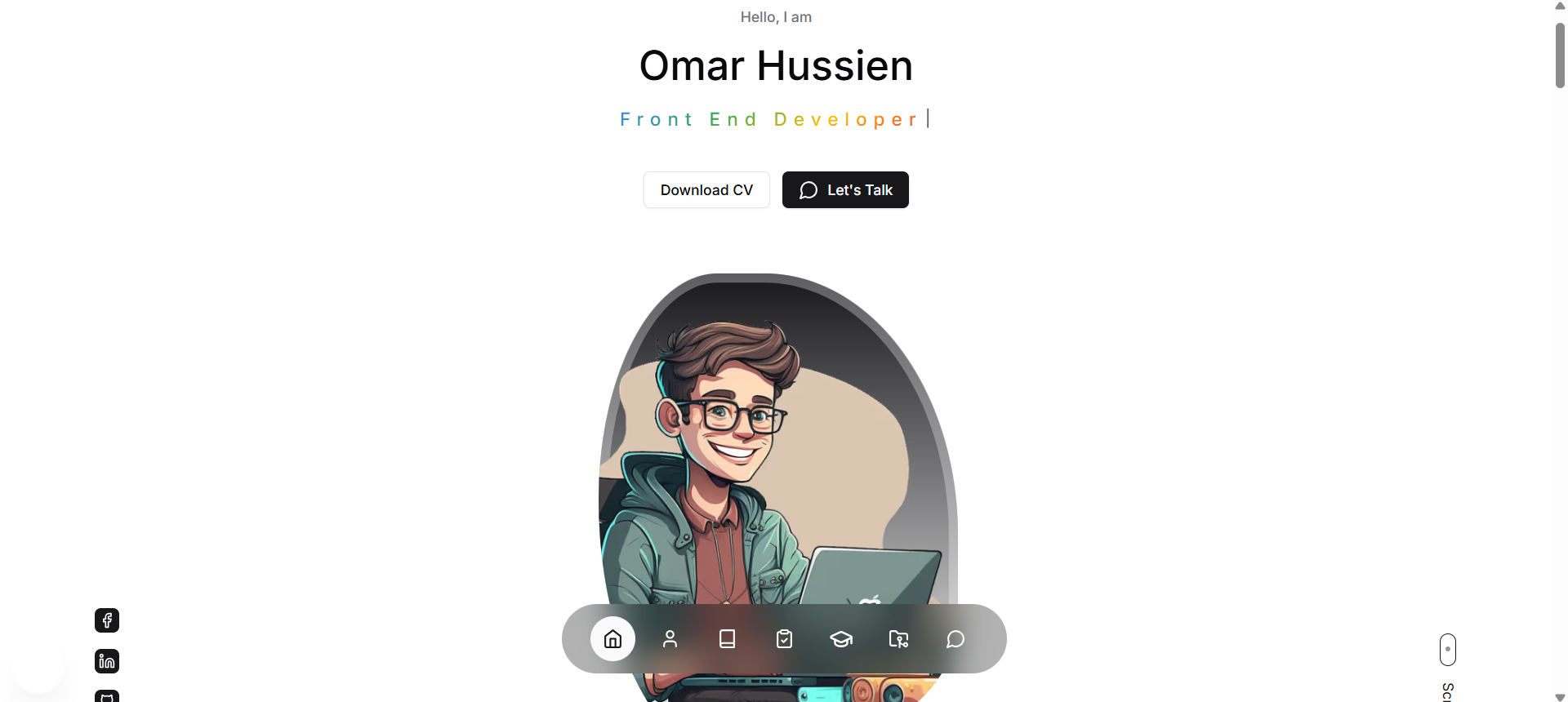
🎯 Header Section - Dynamic Hero Experience
- Challenge: Creating an engaging hero section with typewriter effect showing multiple professional titles
- Solution: Implemented React Simple Typewriter cycling through [“Front End Developer”, “React.js Specialist”, “UI/UX Designer”] with smooth animations, social media integration (Facebook, LinkedIn, GitHub), and responsive profile image display.
📝 About Section - Professional Presentation
- Challenge: Presenting comprehensive professional biography in an engaging, scannable format
- Solution: Created responsive layout showcasing Computer Science background, CCNA certification, freelance experience, and cybersecurity focus with structured bio content and call-to-action elements.
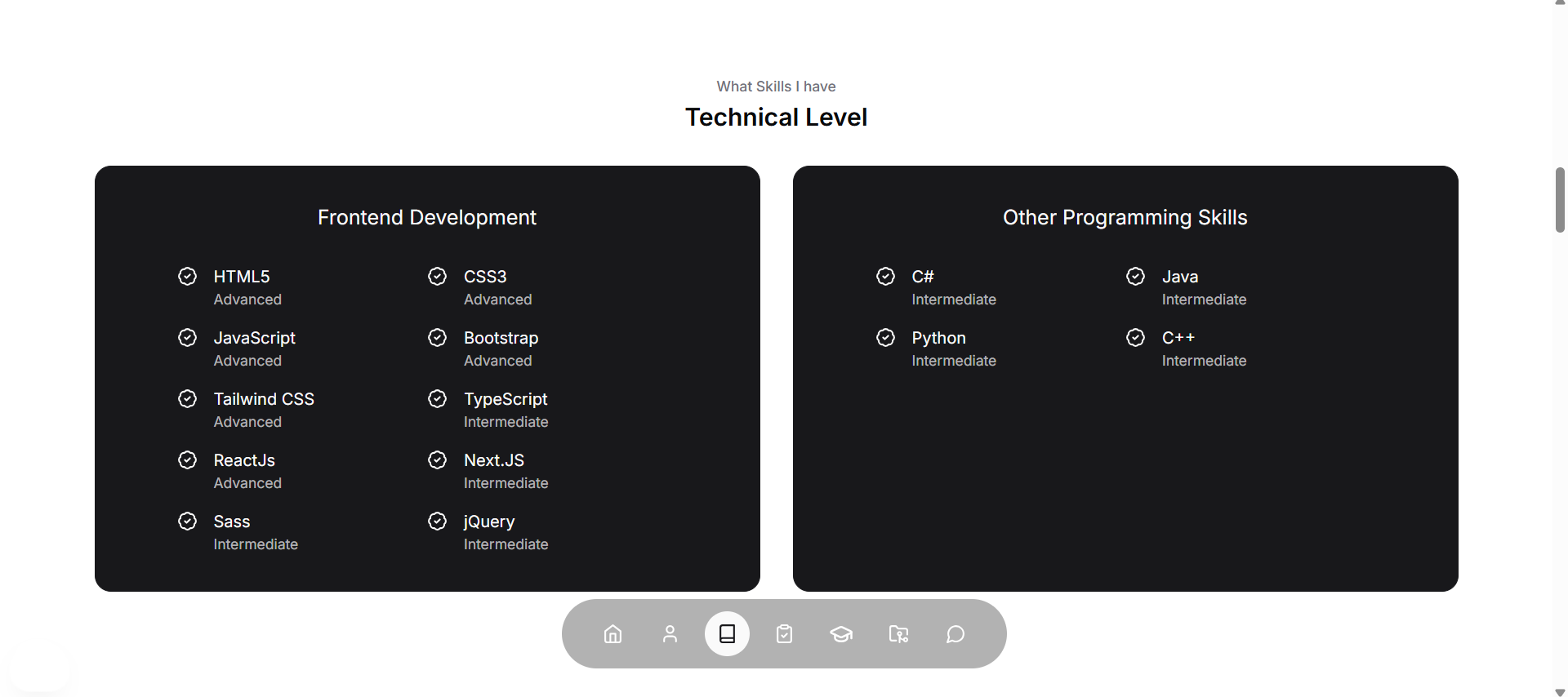
💼 Experience Section - Technical Skills Visualization
- Challenge: Displaying 10 frontend skills and 4 programming languages with proficiency levels
- Solution: Built interactive skill cards showing HTML5, CSS3, JavaScript, React.js, Next.js (Advanced level), TypeScript, Sass, jQuery (Intermediate), plus C#, Java, Python, C++ backend skills with visual progress indicators.
🎯 Expertise Section - Service Categories
- Challenge: Organizing diverse technical services into clear, actionable categories
- Solution: Created 3 service pillars: SEO Optimization (6 services), Web Development (6 services), and Content Creation (5 services) with detailed service descriptions and visual hierarchy.
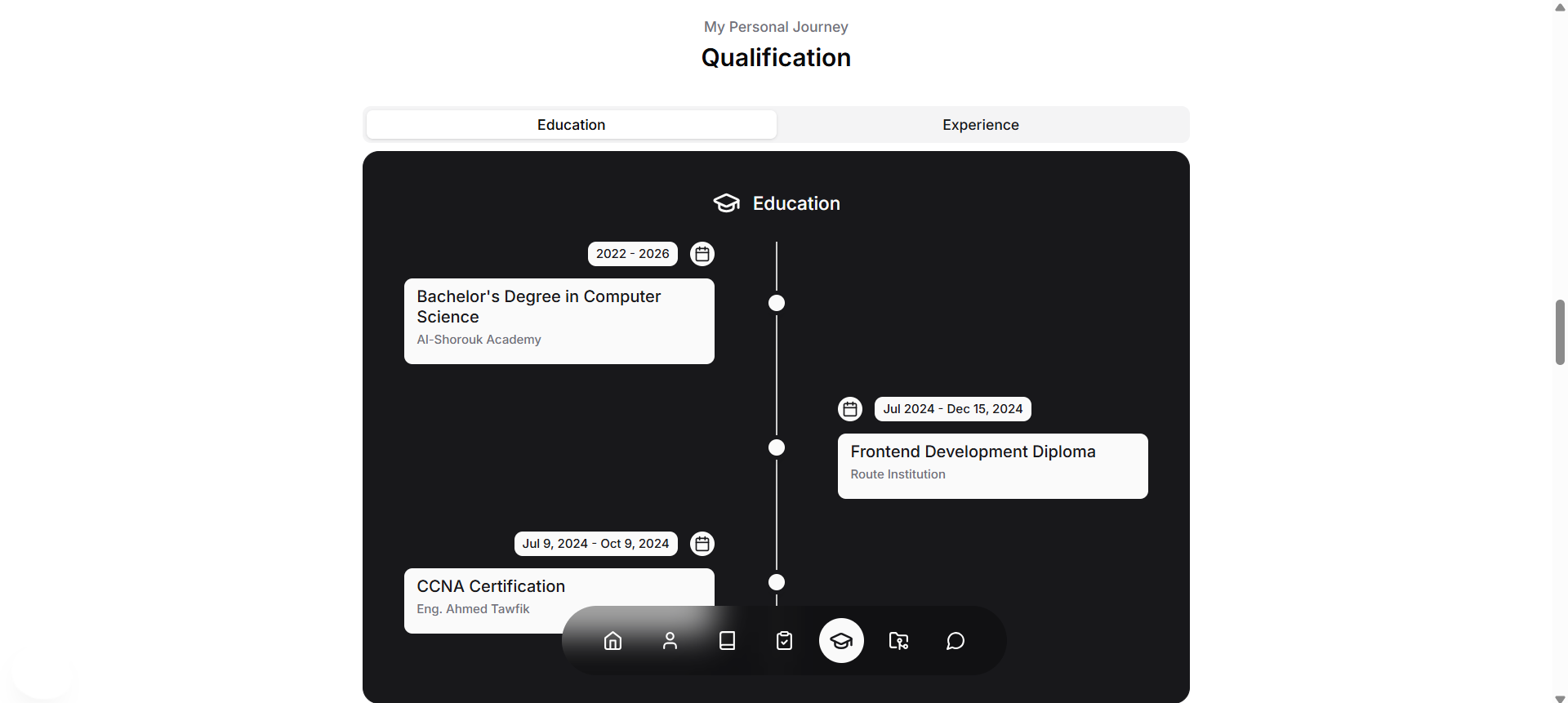
🎓 Qualification Section - Education & Experience Timeline
- Challenge: Presenting education and professional experience in chronological, visual format
- Solution: Implemented interactive timeline showing Bachelor’s in Computer Science (2022-2026), Frontend Development Diploma (2024), CCNA Certification (2024), plus freelance work, graduation project leadership, and open-source contributions.
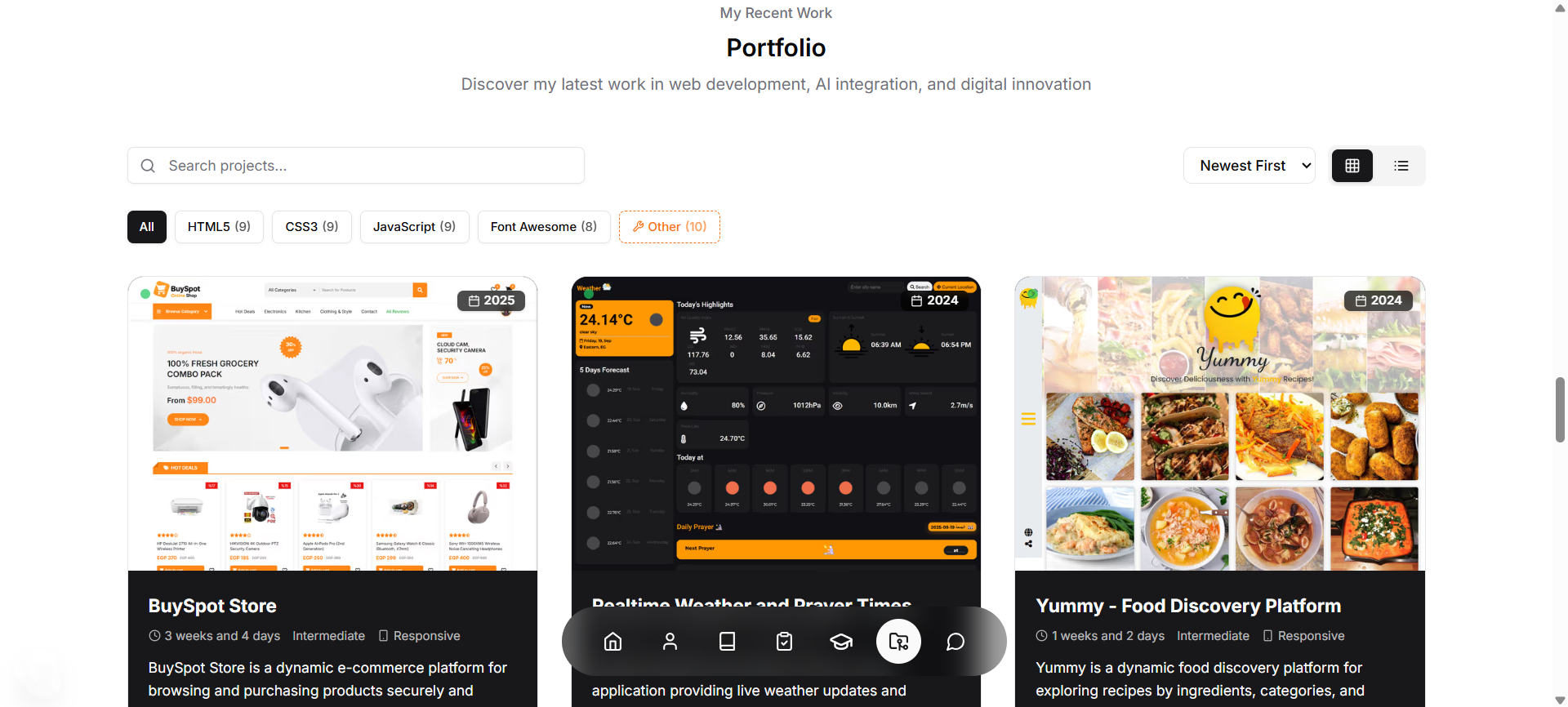
🚀 Portfolio Section - Project Showcase System
- Challenge: Displaying 10 diverse projects with detailed information, filtering, and search capabilities
- Solution: Built advanced portfolio system with projects including BuySpot Store (e-commerce), Realtime Weather App, Yummy Food Discovery, Pharmacy Management (C#), Bookmarker App, Login/Register forms, and restaurant websites. Features include technology filtering, search functionality, detailed project modals with stats, testimonials, and live demos.
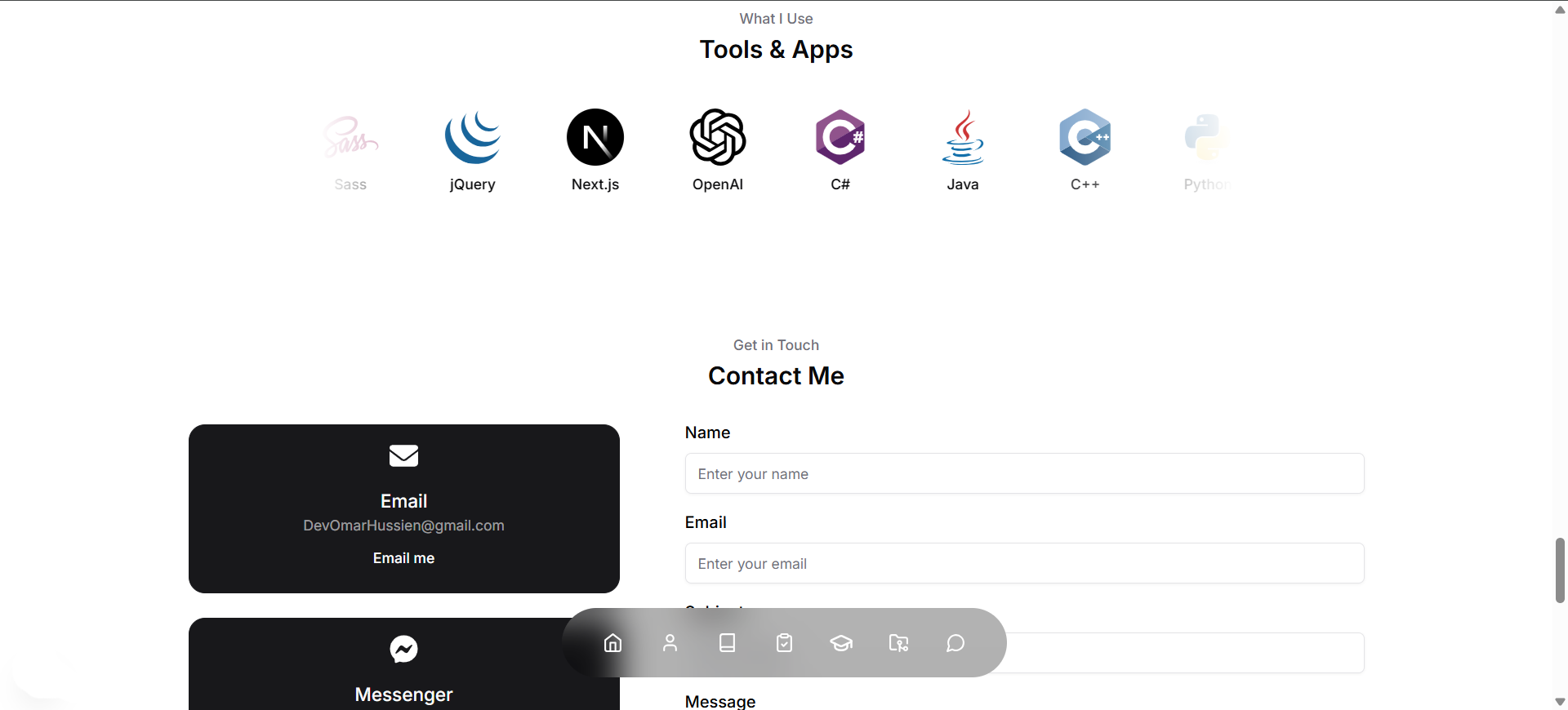
🛠️ Tools Section - Technology Display
- Challenge: Showcasing 26 tools and technologies with visual icons and proper categorization
- Solution: Created responsive grid displaying development tools (Git, GitHub, VS Code), design tools (Figma, Photoshop, Illustrator), frontend technologies (React, Next.js, TypeScript), styling frameworks (Tailwind, Bootstrap), and programming languages with CDN-hosted icons.
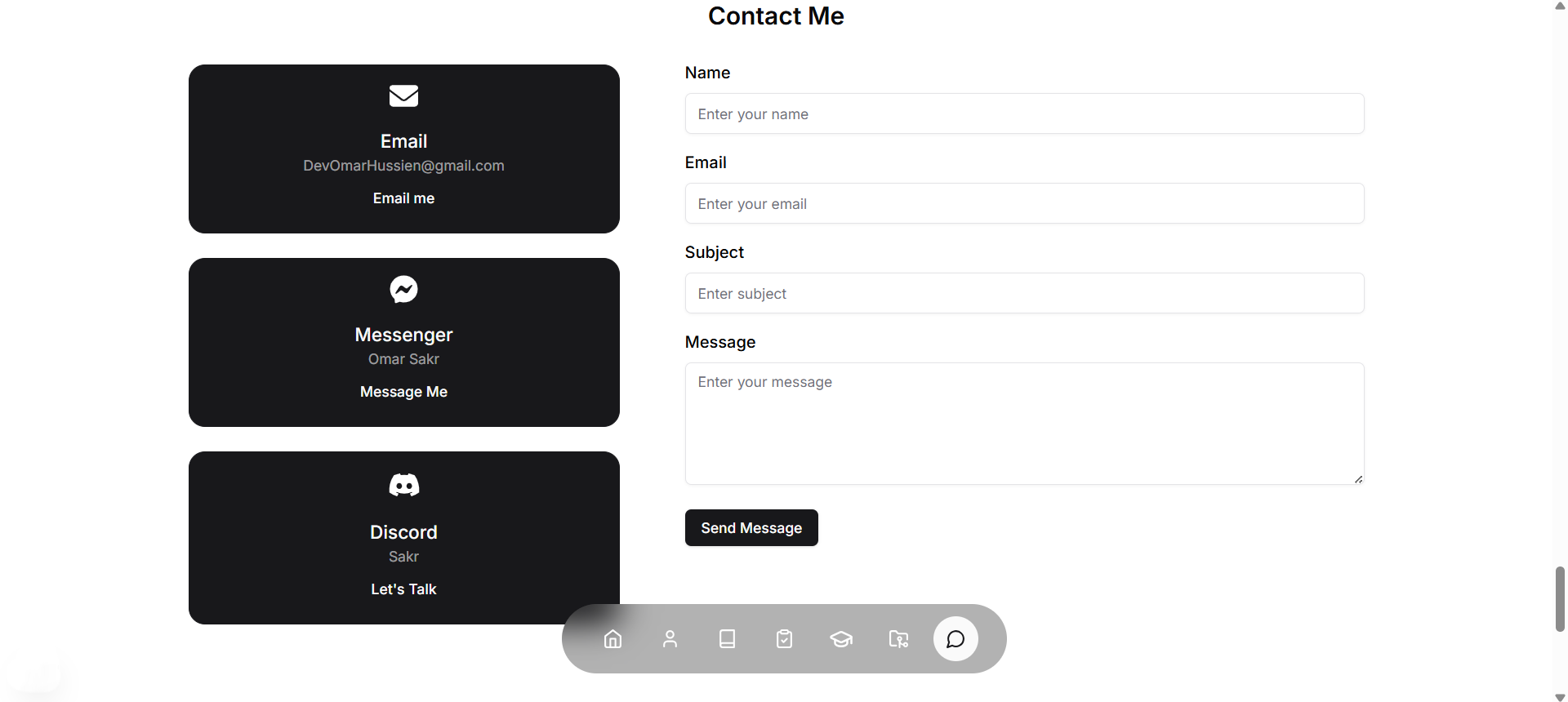
📧 Contact Section - Multi-Channel Communication
- Challenge: Providing multiple contact methods with functional email integration
- Solution: Integrated EmailJS for contact form, direct email links with Gmail fallback, Facebook Messenger integration, and Discord communication with mobile app detection and fallback to web versions.
📌 Future Improvements
- 🗂️ Blog Integration: Add a blog section with MDX support for technical articles
- ☁️ CMS Integration: Connect with Contentful or Strapi for dynamic content management
- 📊 Analytics Dashboard: Add visitor analytics and portfolio performance metrics
- 🎨 Advanced Animations: Implement more sophisticated scroll-triggered animations
- 📤 Project Filtering: Add category-based project filtering and search functionality
- 🔒 Enhanced Security: Add rate limiting and advanced spam protection
- 🌐 Multi-language: Implement i18n for Arabic/English language switching
- 📱 PWA Features: Add offline support and mobile app-like experience
- 🎯 A/B Testing: Implement conversion optimization testing
- 📈 Performance Monitoring: Add real user monitoring and Core Web Vitals tracking
📢 Known Issues
- ⚠️ Animation Performance: Some animations may lag on lower-end devices (optimization planned)
- ⚠️ Email Delivery: EmailJS may have rate limits for free tier (upgrade recommended for production)
- ⚠️ Image Loading: Initial image load may show flash on slow connections (progressive enhancement in progress)
🤝 Contributing
Contributions are welcome! Here’s how to get started:
Development Workflow
- Fork & Clone
git clone https://github.com/your-username/MyPortfolio.git cd MyPortfolio - Create Feature Branch
git checkout -b feature/your-feature-name - Make Changes
- Follow TypeScript best practices
- Add proper type definitions
- Test on multiple devices
- Update documentation if needed
- Commit Changes
git add . git commit -m "feat: add your feature description" - Push & Pull Request
git push origin feature/your-feature-name
Contribution Guidelines
- Follow existing code style and conventions
- Add TypeScript types for new components
- Test responsive design on multiple screen sizes
- Update README.md for significant changes
- Use semantic commit messages
📪 Feedback
💡 Found a bug or have a suggestion? We’d love to hear from you!



📜 License
Licensed under the MIT License.
See the LICENSE file for details.